ROG AuraCore GUI
A GTK3 graphical front-end for controlling the RGB keyboard backlight on ASUS ROG laptops, built on top of rogauracore.
What is ROG AuraCore GUI?
rogauracore is a command-line tool for controlling the Aura RGB backlight on ASUS ROG laptops under Linux. ROG AuraCore GUI wraps it in a native GTK3 desktop application, so you can switch effects, pick colors, and manage presets without typing a single command. The configuration is persisted to ~/.config/rogauracore-gui/config.json and can be applied automatically on login via XDG autostart. Privilege escalation is handled transparently using a udev rule (recommended) or pkexec as a fallback.
Features
All Lighting Modes
Static, Breathing, Color Cycle, and Rainbow. Every effect supported by rogauracore is exposed through a clean dropdown.
Native Color Picker
GTK's built-in color chooser dialog for precise color selection, plus a quick-color panel with 8 preset colors for one-click changes.
Brightness and Speed
Brightness levels 0-3 and animation speed selector for breathing and cycle effects, all adjustable without restarting.
Presets System
Save any lighting configuration as a named preset. Load or delete presets from a dropdown, no config file editing required.
System Tray Integration
Minimize to tray and control quick-color shortcuts directly from the tray icon menu, without opening the full window.
Autostart Support
XDG autostart integration applies your last saved lighting configuration automatically on login, using udev rules or pkexec as a fallback.
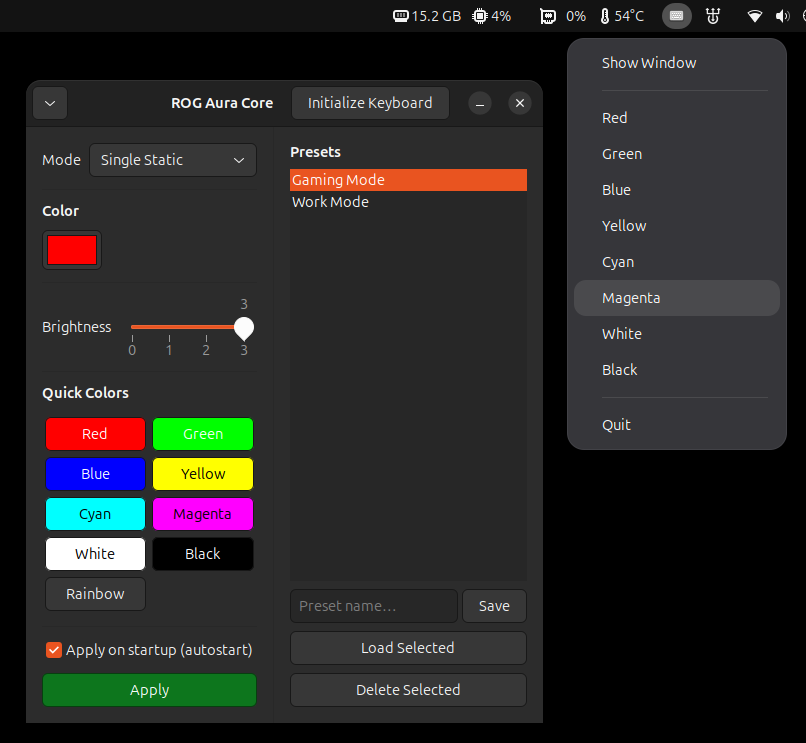
ROG AuraCore GUI running on Ubuntu 26.04 LTS
Supported Hardware
Any laptop supported by rogauracore should work. Confirmed models include:
Tested on Ubuntu 26.04 LTS with Python 3.14.4. Other Debian-based distributions should work as long as GTK3 and rogauracore are available.
Installation
ROG AuraCore GUI is published to a Launchpad PPA. Install it with three commands:
sudo add-apt-repository ppa:alek.cora.glez/rog-auracore-gui
sudo apt update
sudo apt install rog-auracore-gui
Setting up rogauracore
The GUI requires rogauracore to be installed and accessible. For passwordless operation, add the udev rule so your user has USB access without sudo:
# Install rogauracore (required backend)
sudo apt install rogauracore

# Grant USB access without sudo (recommended)
# Add the udev rule shipped with rogauracore:
sudo cp /usr/lib/udev/rules.d/99-rogauracore.rules /etc/udev/rules.d/
sudo udevadm control --reload-rules && sudo udevadm trigger
Without the udev rule, the application falls back to pkexec and will prompt for your password each time it applies a lighting change.
Summary
- GTK3 native app - no Electron, no browser, just a lightweight Python + GTK3 desktop tool
- All rogauracore modes - Static, Breathing, Color Cycle, Rainbow with full parameter control
- Presets and autostart - save your favorite configs and apply them automatically on login
- PPA install - one-line install on Ubuntu/Debian, automatic updates via apt
- Open source - free to use, inspect, and contribute to